Talking Modbus to a Huawei SUN2000 over its own WiFi, and why NAT is not an option
Without a Smart Dongle, a Huawei SUN2000 only speaks Modbus-TCP on its own WiFi AP. Getting Home Assistant on it meant a login proxy and no NAT.
Also available in: Nederlands · Română
The house in Romania has a Huawei SUN2000-8K-LC0 with a LUNA2000 battery and 11.8 kWp of panels. Huawei's cloud, FusionSolar, shows what it produces, but only as five-minute averages. I wanted live numbers in Home Assistant, and eventually the ability to tell the battery when to charge. That means Modbus-TCP, locally.
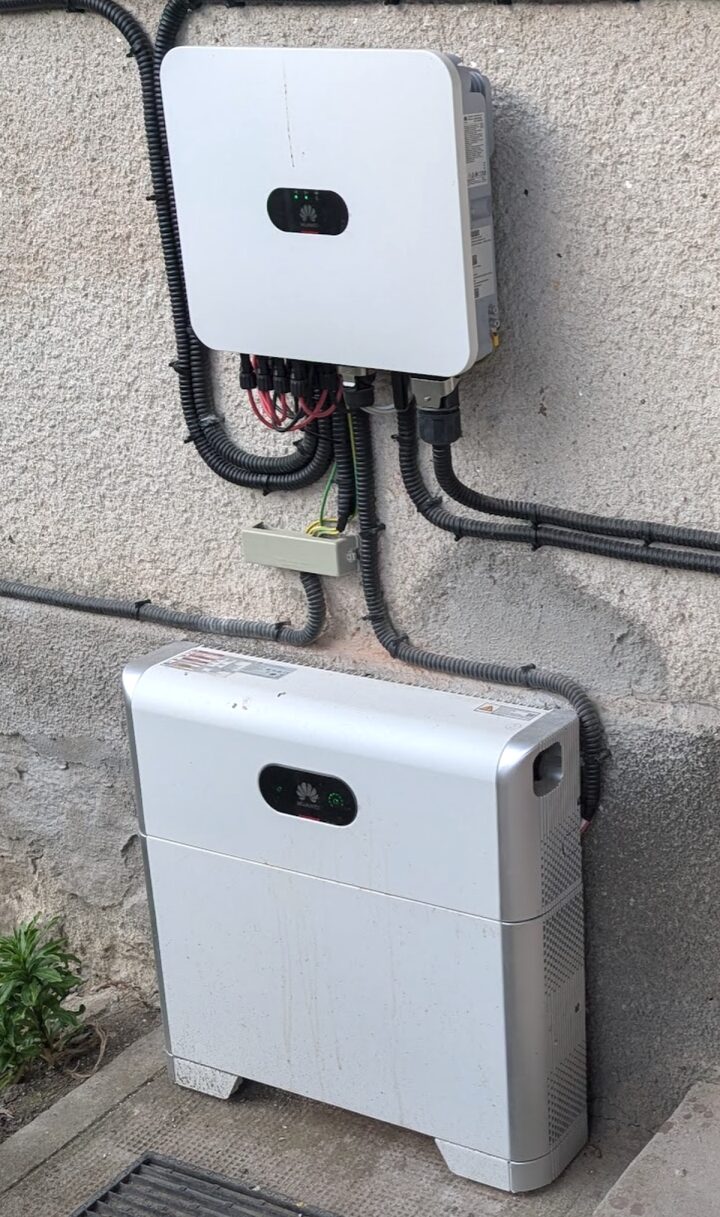
The normal way to get it is Huawei's Smart Dongle, which exposes Modbus on the house LAN. This inverter does not have one. What it does have is a built-in WiFi access point, meant for the installer's phone during commissioning, and on that network the inverter listens on port 6607. I set out to make that access point a permanent data link, and found a set of limitations that only show up once you try.
Getting onto the inverter's network
The inverter's AP is a closed little world: it hands the client an address in 192.168.8.0/24, the inverter itself is 192.168.8.1, and there is no route anywhere else. Home Assistant runs in Docker on an Unraid server in the house, which is on the normal LAN. Something has to bridge the two.
The obvious plan is the one every network engineer reaches for first: put a WiFi stick in the server, associate it with the inverter AP, and NAT the LAN through it. Anything that wants the inverter sends packets to 192.168.8.1, the server masquerades them out of wlan0, done.
The TCP part of that plan works perfectly. The SYN goes out, the SYN-ACK comes back, the handshake completes, and pings are a steady 2 ms. Then the inverter says nothing: every Modbus request is acknowledged at TCP level and never answered.
The protocol is Modbus with a Huawei login in front
Before blaming the network I had to rule out the protocol, because port 6607 is not plain Modbus. It uses standard Modbus-TCP framing, but on the WiFi AP the inverter refuses every register read with an exception until the client has logged in. The login is a Huawei-specific function code, 0x41:
| step | PDU | meaning |
|---|---|---|
| 1 | 41 24 01 00 | ask for a 16-byte challenge |
| 2 | 41 25 <len> <client challenge> <user> <digest> | log in as installer |
The digest is HMAC-SHA256(key = SHA256(password), message = inverter's challenge). The excellent huawei-solar Python library implements all of this, and the Home Assistant integration uses it.
So with the right library and the right password, everything should have worked. Over the NAT it did not: the challenge request itself, all eleven bytes of it, timed out every time.
No NAT to the inverter
What finally worked was taking NAT out of the inverter-facing leg completely. I passed the WiFi stick straight into a VM, let the VM associate with the AP itself, and ran the library on the machine that owned the WiFi link. Login succeeded on the first try, and so did every register read after it.
From there the rule became: the TCP connection that reaches the inverter must start on the box that is associated with its access point. Anything further away talks to a proxy on that box, and the proxy opens a brand-new connection of its own. The inverter never sees a forwarded or translated flow.
The same tests showed a second constraint: the inverter only answered a client at 192.168.8.2. With a static .199, association and TCP were fine, and the inverter was just as silent as through the NAT. Some of the failed NAT experiments ran from a different address, so I cannot fully separate the two effects. In practice it does not matter, because the same design satisfies both:
Home Assistant ──► proxy on the WiFi box :6607
                     │  fresh TCP, source 192.168.8.2
                     ▼
                   inverter 192.168.8.1:6607
Translated and forwarded flows were never answered, a fresh socket from .2 always was, and I stopped trying to be clever.
The proxy has to log in, too
The first proxy was a one-line socat. Home Assistant still could not add the inverter, because of ordering: during setup the integration reads the model name to work out what kind of device it is talking to, and it does that before it logs in. This inverter refuses that read, so detection fails and setup aborts.
The fix was to make the proxy do the login itself. For each incoming connection it opens a new TCP connection to the inverter, performs the 0x41 challenge and login, and only then starts piping bytes in both directions. Home Assistant gets a session that is already authenticated, so detection and reads work. The session has installer rights, so writes (battery modes, time-of-use schedules) work too. The proxy is under a hundred lines of asyncio, and a shell loop restarts it if it ever exits.
Limitations we hit along the way
One Modbus session, total
The inverter serves exactly one Modbus client at a time. While Home Assistant holds the session, a second client (a test script, or the FusionSolar app on a phone connected to the same AP) either gets refused or knocks Home Assistant off. The integration then logs "the inverter only supports one Modbus connection at a time". That warning appears on any interrupted read, so it is a clue, and you still have to find the actual cause.
The host's network tooling wants that interface
Unraid's own wireless scripts start a DHCP client on any WiFi interface. The inverter AP does not answer DHCP the way that client expects, so it gives up, assigns a 169.254.x.x link-local address, and the static 192.168.8.2 is gone. I fixed it with a small guard script that keeps wlan0 out of the DHCP daemon's configuration and puts the address back if anything removes it. (Whatever you do, do not run dhcpcd by hand against wlan0 on that box. It manages the main bridge, and I took the whole server off the network finding that out.)
A USB WiFi stick is a weak radio
The cheap 2.4 GHz stick in the server spent bad days between −67 and −73 dBm. That is enough to associate and too little to stay associated. From Home Assistant's side a link flap looks exactly like a Modbus failure, so the first thing to check is always the radio: iw dev wlan0 link.
The Modbus engine can wedge on its own, and a reboot may not fix it
The most confusing failure looks like this in a packet capture: the connection opens, the eleven-byte login request goes out, the inverter acknowledges it at TCP level, and then it never replies. Even a plain register read without login does not get the usual "log in first" exception back; the engine is completely silent. This repeats every fifteen seconds for hours. The WiFi is fine, pings are fine, DHCP still hands the stick its 192.168.8.2, and there is no other client. To be sure it was not my end, I tried every path to the inverter side by side: a raw socket, the socat forwarder and the login proxy. They all timed out identically, so whatever was wrong was on 192.168.8.1.
My instinct was to reboot the inverter, and that is where I lost the most time. Switching it off and on from the app did nothing. The giveaway was that the server's WiFi client never reassociated, so the communication board had stayed up the whole time. So I went further: a full cold shutdown, with AC and DC isolated and both batteries off for several minutes. This time the board really did restart (wlan0 dropped and came back), and Modbus was still silent.
In the end it was not a reboot that brought it back. I joined the inverter's own SUN2000-… WiFi with a phone and logged into the SUN2000 app. The instant that management session was established, Modbus started answering: first with the "log in first" exception it had been withholding, and then, through the proxy, with a clean installer login and live data in Home Assistant.
So the SUN2000 app's local screen talks to the inverter over Huawei's own management protocol, not Modbus. When the app works locally, that tells you the board is healthy; it tells you nothing about Modbus-TCP. And when Modbus has gone fully silent, what wakes it is a local management login from the app. A power cycle does not. If it happens again, I log into the app once and Home Assistant recovers on its own.
What the link is for
With the session in place, Home Assistant is not just a read-only display. The proxy logs in with installer rights, so the same Modbus connection writes settings back to the inverter.
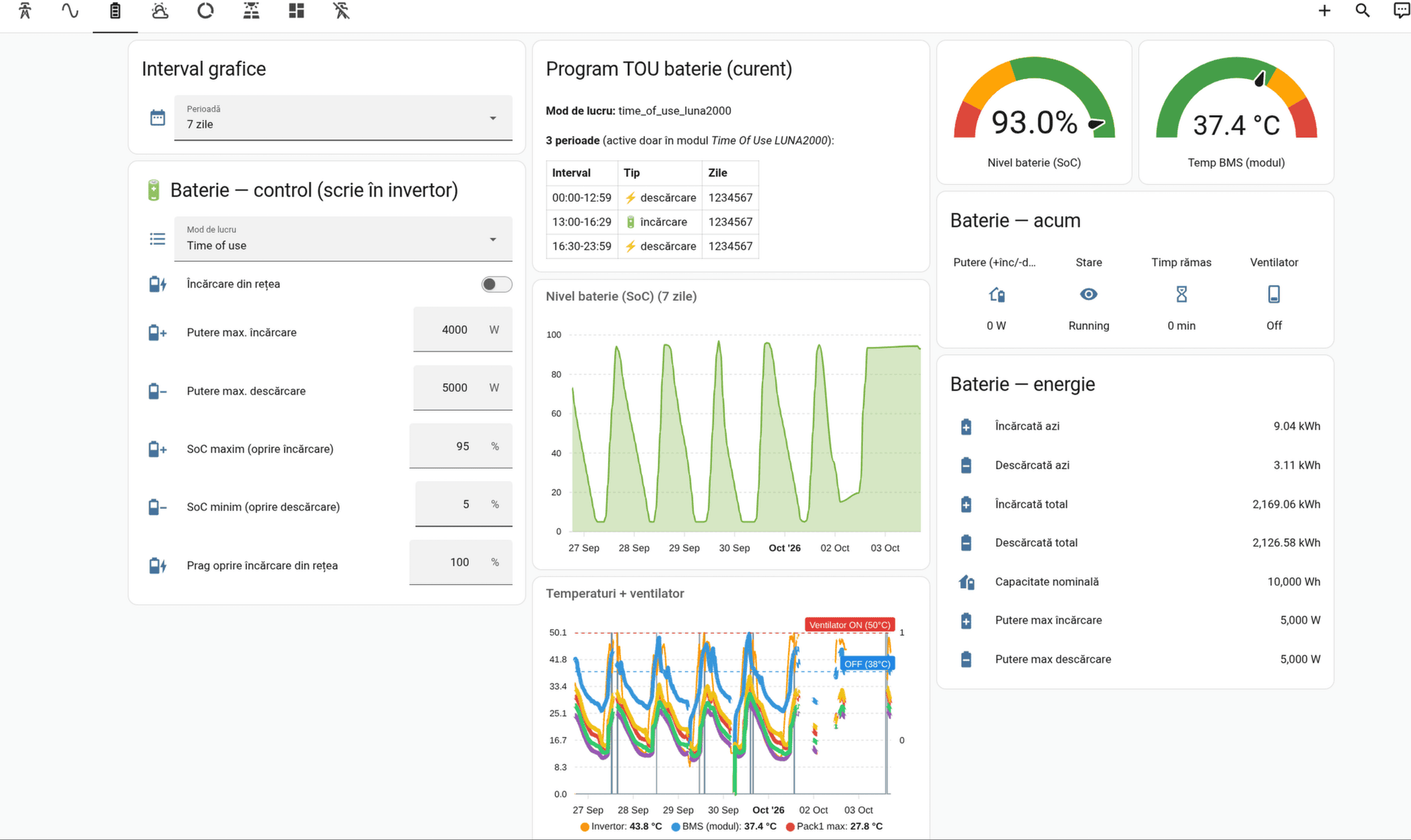
The battery is the obvious use. From one dashboard I set the working mode (time of use, in my case), whether the battery may charge from the grid, the maximum charge and discharge power, the state-of-charge limits for when charging and discharging stop, and the time-of-use schedule itself. The schedule below discharges overnight and through the morning, charges between 13:00 and 16:30, and discharges again in the evening.
The less obvious use is reactive power. The inverter disconnects when the grid voltage at the connection point reaches 253 V. The local grid is congested, and around midday the voltage at my meter climbs towards that limit on most days; the hourly maximum touched it several times in this one week. Before it gets there, a P(U) curve should cut active power and a Q(U) curve should make the inverter absorb reactive power, which pulls the voltage down and keeps the inverter connected instead of tripping into an emergency shutdown. Both curves are inverter settings, so I can tune them from Home Assistant and watch the effect on the same screen.
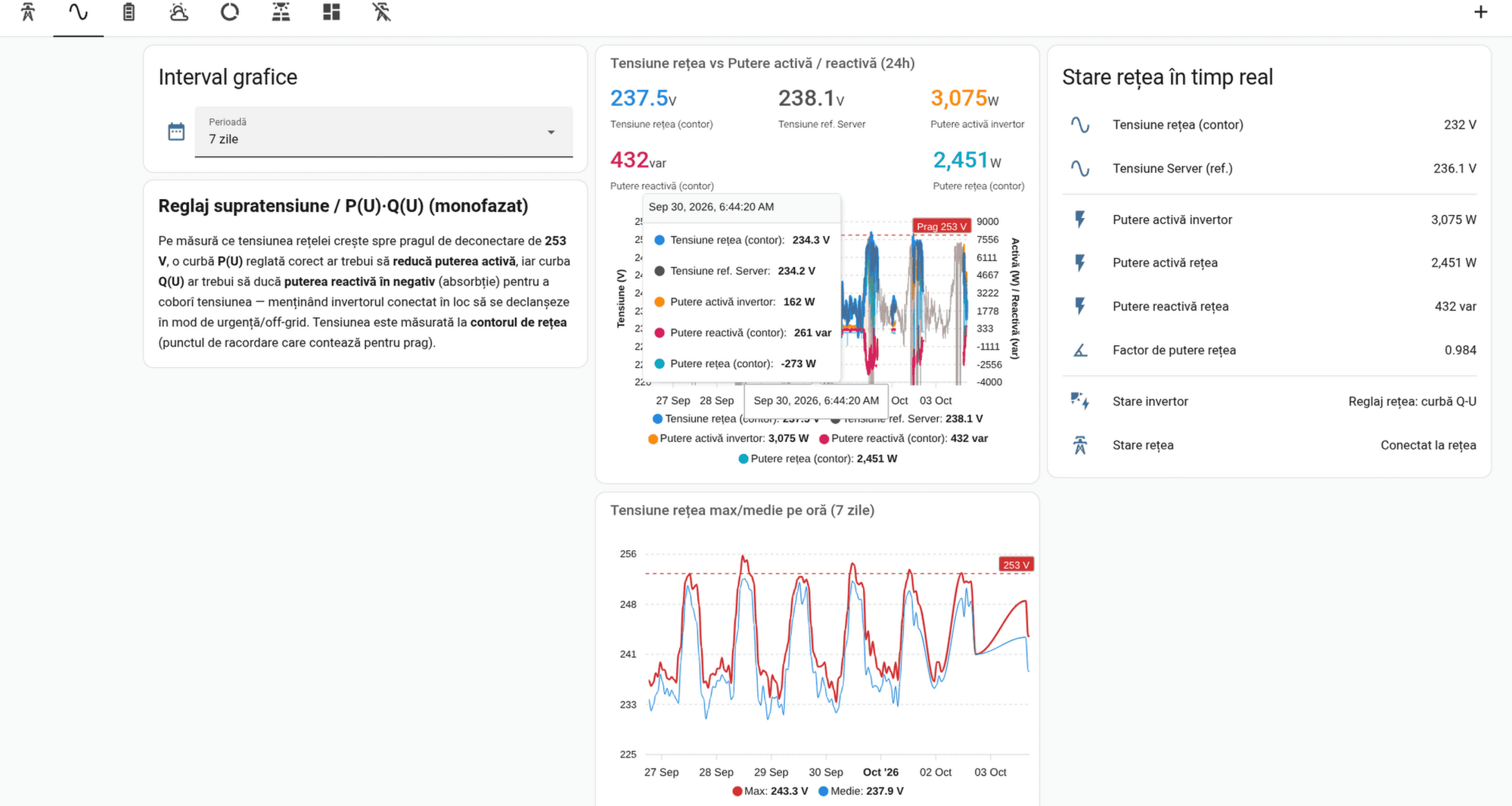
There is a cost to doing this over the inverter's own WiFi, and the screenshots show it. The link to the AP is not always reliable, and when it drops, so does the data: the temperature graph has holes around 2 and 3 October, and the state-of-charge line simply joins the last point before the gap to the first one after it. A Smart Dongle on the house LAN would probably be more stable. For now I have decided not to buy one, because what I have is stable enough for me.
Next: let an access point do it
All of this lives on a server with a USB stick hanging off it, which is the weakest part of the chain. The house has three old first-generation UniFi access points, recently moved to OpenWrt and managed with OpenWISP. In a first test one of them, a UAP-Pro, heard the inverter at −56 dBm, against −63 dBm for the USB stick on a good day, so the plan is to move the inverter link there.
The no-NAT rule decides how. Associating the AP as a client and masquerading the LAN through it is exactly the setup that never got an answer, so the AP gets the same treatment as the server did:
- the 2.4 GHz radio associates with the inverter as a station, with a static
192.168.8.2and no gateway and no DNS on that interface, so nothing on the inverter side can ever take over the AP's own default route; - a
socaton the AP listens on its LAN address, accepts only the Home Assistant server, and opens a fresh connection to192.168.8.1:6607bound to192.168.8.2; - the server's login proxy just points at the AP instead of at
192.168.8.1.
There is no forwarding and no masquerade; ip_forward stays off. The inverter still sees exactly one fresh TCP connection from .2.
One OpenWrt detail mattered more than I expected. A radio can serve an access point and a station at the same time, but the AP follows the station: whenever the station loses its upstream, the AP on that radio goes down with it. The inverter's AP is not exactly reliable, so if they shared the radio, the house WiFi on that AP would blink every time the inverter's did. That 2.4 GHz radio is therefore dedicated to the inverter link, and the 5 GHz radio and the other two APs carry the house.
I have postponed the cutover for now, so the USB stick is still doing the job.
What I would tell myself at the start
- If the inverter has no Smart Dongle, port 6607 on its own WiFi is real Modbus-TCP, with a mandatory installer login.
- Never NAT the leg that reaches the inverter. Proxy, and originate from
192.168.8.2. - Expect one Modbus session. Anything else that connects will cost you data.
- A TCP-level ACK with no Modbus reply means the problem is the inverter, not your network. Before trusting a "restart", check whether the WiFi association survived it.
- If Modbus goes completely silent (no reply even to an unauthenticated read), a power cycle may not revive it. A local login from the SUN2000 app does, because that is a different protocol that wakes the management stack. "The app works" is not proof that Modbus is up.